

Guarantee
You have 14 days to return the product if you are not satisfied.

You have 14 days to return the product if you are not satisfied.
Payment Security
We work with the best payment partners to ensure your transactions are 100% secure.

We work with the best payment partners to ensure your transactions are 100% secure.
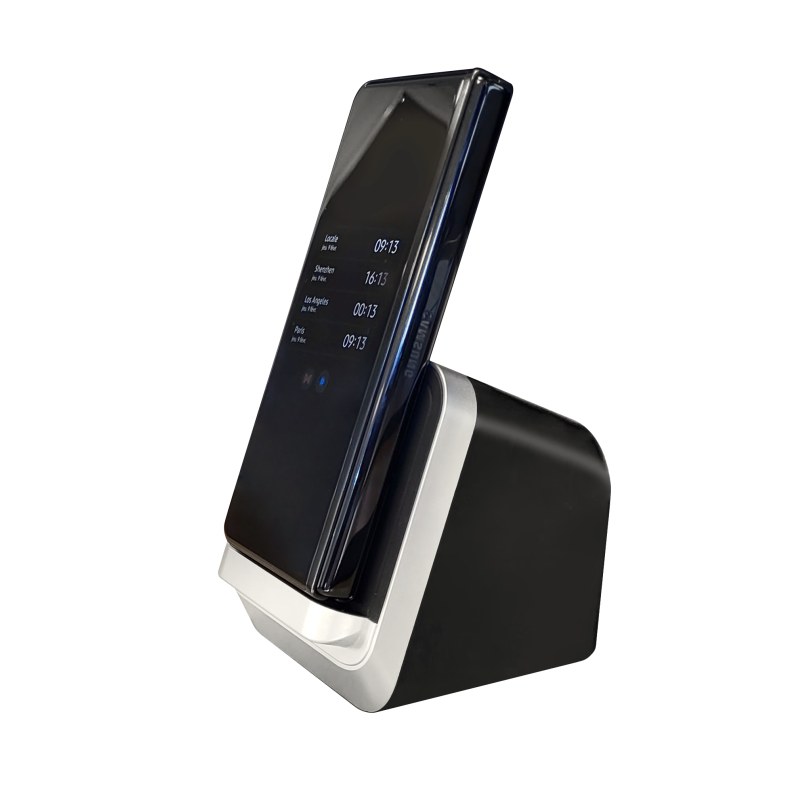
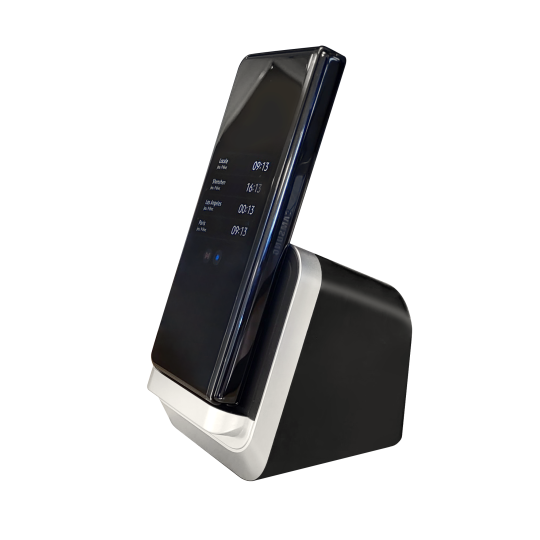
Votre Galaxy dans la poche, votre bureau sur n'importe quel \u00e9cran. Le MiraDock transforme n'importe quel moniteur en station de travail Samsung DeX \u2014 sans PC, sans c\u00e2bles inutiles, sans compromis.
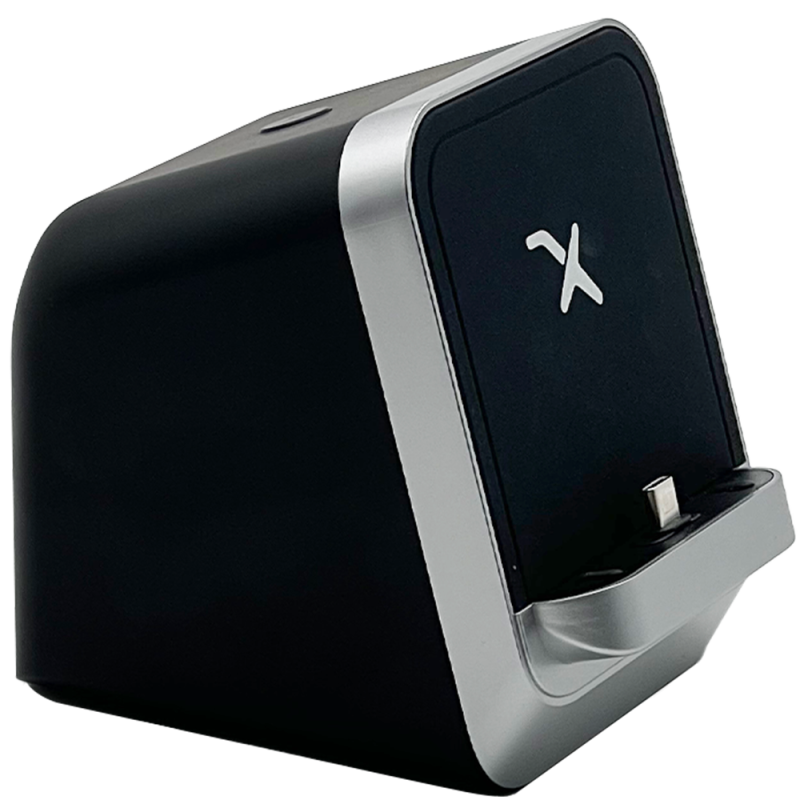
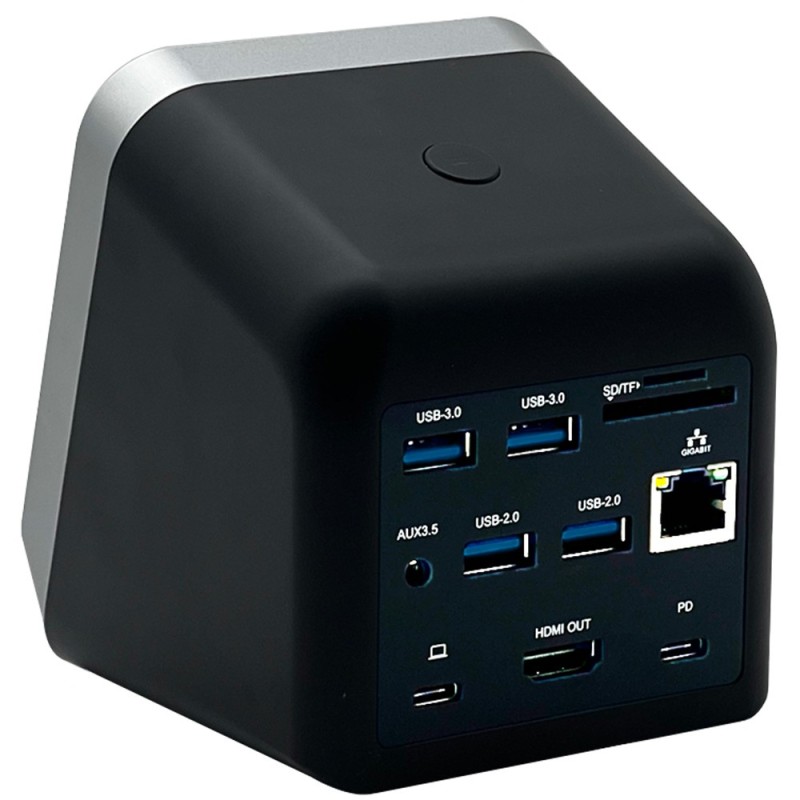
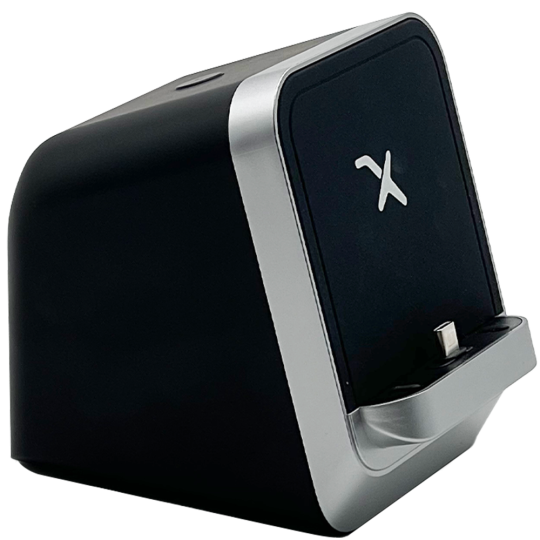
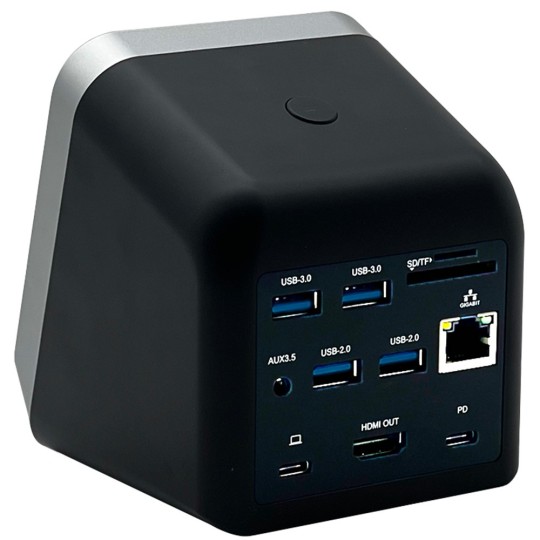
\n\nLe MiraDock est le dock USB-C con\u00e7u sp\u00e9cifiquement pour Samsung DeX et Android Desktop Mode. Contrairement aux docks g\u00e9n\u00e9riques, il est calibr\u00e9 pour offrir une exp\u00e9rience bureau fluide avec votre Galaxy : HDMI 4K, Ethernet Gigabit, 4 ports USB-A, lecteur de cartes, et charge USB-C \u2014 tout ce dont vous avez besoin pour un vrai poste de travail.
\n\nUn dock, tous vos p\u00e9riph\u00e9riques. Branchez le MiraDock sur votre Samsung Galaxy via USB-C et connectez simultan\u00e9ment un moniteur, un clavier, une souris, un disque dur et un r\u00e9seau filaire.
\n\nLe MiraDock est test\u00e9 et valid\u00e9 sur les appareils Samsung suivants :
\n-> V\u00e9rifiez si votre appareil est compatible avec Android Desktop Mode
\n\n| Sortie vid\u00e9o | HDMI 4K (3840x2160) |
| Ports USB-A | 4x USB-A 3.0 |
| Ports USB-C | 3x USB-C (dont 2 entr\u00e9es, 1 charge PD) |
| R\u00e9seau | Ethernet Gigabit 1 Gb/s |
| Lecteur de cartes | MicroSD + SD |
| Audio | Jack 3,5 mm (sortie) |
| Protocole vid\u00e9o | USB-C DisplayPort Alt Mode |
| Compatibilit\u00e9 | Samsung DeX, Motorola Ready For, EMUI Desktop, Android Desktop Mode |
| Livraison | Dans toute l'Europe depuis la France |
Il est compatible avec tous les appareils Galaxy qui prennent en charge Samsung DeX en connexion filaire (USB-C DP). Les mod\u00e8les S8, S9, S10, S20 et ult\u00e9rieurs sont enti\u00e8rement compatibles. Les Galaxy A milieu de gamme ne supportent g\u00e9n\u00e9ralement pas DeX filaire.
\n\nLe MiraDock dispose d'une sortie HDMI. Samsung DeX prend en charge un seul \u00e9cran externe en mode filaire. Pour deux moniteurs, il vous faudrait un splitter HDMI ou un adaptateur suppl\u00e9mentaire.
\n\nOui. La charge USB-C Power Delivery du MiraDock maintient votre Galaxy charg\u00e9 pendant l'utilisation du mode bureau. Vous pouvez travailler toute la journ\u00e9e sans vider la batterie de votre t\u00e9l\u00e9phone.
\n\nLe MiraDock est s\u00e9lectionn\u00e9 et test\u00e9 sp\u00e9cifiquement pour Samsung DeX et Android Desktop Mode. Les docks g\u00e9n\u00e9riques disponibles en magasin peuvent pr\u00e9senter des probl\u00e8mes de compatibilit\u00e9 DP Alt Mode. Nous garantissons la compatibilit\u00e9.
\n\nNon. Branchez le MiraDock sur votre Samsung via USB-C, connectez un moniteur HDMI, et DeX s'active automatiquement. Aucune installation requise.
\n\nAllez plus loin avec Samsung DeX : notre guide complet des meilleurs accessoires DeX pour 2026 \u2014 avec des recommandations de configuration pour votre usage.
", "2": "Your Galaxy in your pocket, your desktop on any screen. The MiraDock turns any monitor into a Samsung DeX workstation \u2014 no PC needed, no unnecessary cables, no compromise.
\n\nThe MiraDock is the USB-C dock designed specifically for Samsung DeX and Android Desktop Mode. Unlike generic docks, it is calibrated to deliver a smooth desktop experience with your Galaxy: 4K HDMI, Gigabit Ethernet, 4 USB-A ports, card reader, and USB-C charging \u2014 everything you need for a real workstation.
\n\nOne dock, all your peripherals. Plug the MiraDock into your Samsung Galaxy via USB-C and simultaneously connect a monitor, keyboard, mouse, hard drive, and wired network.
\n\nThe MiraDock is tested and validated on the following Samsung devices:
\n-> Check if your device is compatible with Android Desktop Mode
\n\n| Video output | HDMI 4K (3840x2160) |
| USB-A ports | 4x USB-A 3.0 |
| USB-C ports | 3x USB-C (including 2 inputs, 1 PD charging) |
| Network | Gigabit Ethernet 1 Gb/s |
| Card reader | MicroSD + SD |
| Audio | 3.5mm jack (output) |
| Video protocol | USB-C DisplayPort Alt Mode |
| Compatibility | Samsung DeX, Motorola Ready For, EMUI Desktop, Android Desktop Mode |
| Shipping | Across Europe from France |
It is compatible with all Galaxy devices that support Samsung DeX via wired connection (USB-C DP). Models S8, S9, S10, S20 and later are fully compatible. Mid-range Galaxy A models generally do not support wired DeX.
\n\nThe MiraDock has one HDMI output. Samsung DeX supports a single external screen in wired mode. For two monitors, you would need an HDMI splitter or an additional adapter.
\n\nYes. The MiraDock's USB-C Power Delivery charging keeps your Galaxy charged while you use desktop mode. You can work all day without draining your phone's battery.
\n\nThe MiraDock is selected and tested specifically for Samsung DeX and Android Desktop Mode. Generic docks available in stores may have DP Alt Mode compatibility issues. We guarantee compatibility.
\n\nNo. Plug the MiraDock into your Samsung via USB-C, connect an HDMI monitor, and DeX activates automatically. No installation required.
\n\nGo further with Samsung DeX: our complete guide to the best DeX accessories for 2026 \u2014 with setup recommendations for your use case.
", "3": "Dein Galaxy in der Tasche, dein Desktop auf jedem Bildschirm. Das MiraDock verwandelt jeden Monitor in eine Samsung DeX-Workstation \u2013 kein PC n\u00f6tig, keine unn\u00f6tigen Kabel, kein Kompromiss.
\n\nDas MiraDock ist das USB-C-Dock, das speziell f\u00fcr Samsung DeX und den Android Desktop Mode entwickelt wurde. Im Gegensatz zu generischen Docks ist es darauf ausgelegt, ein fl\u00fcssiges Desktop-Erlebnis mit deinem Galaxy zu bieten: 4K HDMI, Gigabit-Ethernet, 4 USB-A-Ports, Kartenleser und USB-C-Ladung \u2013 alles, was du f\u00fcr eine echte Workstation brauchst.
\n\nEin Dock, alle deine Peripherieger\u00e4te. Schlie\u00dfe das MiraDock \u00fcber USB-C an dein Samsung Galaxy an und verbinde gleichzeitig einen Monitor, Tastatur, Maus, Festplatte und ein kabelgebundenes Netzwerk.
\n\nDas MiraDock ist auf folgenden Samsung-Ger\u00e4ten getestet und validiert:
\n-> Pr\u00fcfe, ob dein Ger\u00e4t mit Android Desktop Mode kompatibel ist
\n\n| Videoausgang | HDMI 4K (3840x2160) |
| USB-A-Ports | 4x USB-A 3.0 |
| USB-C-Ports | 3x USB-C (darunter 2 Eing\u00e4nge, 1 PD-Laden) |
| Netzwerk | Gigabit-Ethernet 1 Gb/s |
| Kartenleser | MicroSD + SD |
| Audio | 3,5-mm-Klinke (Ausgang) |
| Videoprotokoll | USB-C DisplayPort Alt Mode |
| Kompatibilit\u00e4t | Samsung DeX, Motorola Ready For, EMUI Desktop, Android Desktop Mode |
| Versand | Europaweit ab Frankreich |
Es ist kompatibel mit allen Galaxy-Ger\u00e4ten, die Samsung DeX \u00fcber eine kabelgebundene Verbindung (USB-C DP) unterst\u00fctzen. Die Modelle S8, S9, S10, S20 und neuere sind vollst\u00e4ndig kompatibel. Mittelklasse-Galaxy-A-Modelle unterst\u00fctzen in der Regel kein kabelgebundenes DeX.
\n\nDas MiraDock verf\u00fcgt \u00fcber einen HDMI-Ausgang. Samsung DeX unterst\u00fctzt im kabelgebundenen Modus nur einen externen Bildschirm. F\u00fcr zwei Monitore w\u00e4re ein HDMI-Splitter oder ein zus\u00e4tzlicher Adapter erforderlich.
\n\nJa. Das USB-C Power Delivery-Laden des MiraDock h\u00e4lt dein Galaxy geladen, w\u00e4hrend du den Desktop-Modus nutzt. Du kannst den ganzen Tag arbeiten, ohne den Akku deines Smartphones zu entleeren.
\n\nDas MiraDock ist speziell f\u00fcr Samsung DeX und den Android Desktop Mode ausgew\u00e4hlt und getestet. Generische Docks aus dem Handel k\u00f6nnen Kompatibilit\u00e4tsprobleme mit DP Alt Mode aufweisen. Wir garantieren die Kompatibilit\u00e4t.
\n\nNein. Schlie\u00dfe das MiraDock \u00fcber USB-C an dein Samsung an, verbinde einen HDMI-Monitor, und DeX aktiviert sich automatisch. Keine Installation erforderlich.
\n\nMehr aus Samsung DeX herausholen: unser vollst\u00e4ndiger Leitfaden zu den besten DeX-Zubeh\u00f6rteilen f\u00fcr 2026 \u2014 mit Setup-Empfehlungen f\u00fcr deinen Anwendungsfall.
", "5": "Il tuo Galaxy in tasca, il tuo desktop su qualsiasi schermo. MiraDock trasforma qualsiasi monitor in una workstation Samsung DeX \u2014 senza PC, senza cavi inutili, senza compromessi.
\n\nIl MiraDock \u00e8 il dock USB-C progettato specificamente per Samsung DeX e la modalit\u00e0 Android Desktop Mode. A differenza dei dock generici, \u00e8 calibrato per offrire un'esperienza desktop fluida con il tuo Galaxy: HDMI 4K, Ethernet Gigabit, 4 porte USB-A, lettore di schede e ricarica USB-C \u2014 tutto il necessario per una vera workstation.
\n\nUn solo dock, tutte le periferiche. Collega MiraDock al tuo Samsung Galaxy tramite USB-C e connetti simultaneamente un monitor, una tastiera, un mouse, un hard disk e una rete cablata.
\n\nMiraDock \u00e8 testato e validato sui seguenti dispositivi Samsung:
\n-> Verifica se il tuo dispositivo \u00e8 compatibile con Android Desktop Mode
\n\n| Uscita video | HDMI 4K (3840x2160) |
| Porte USB-A | 4x USB-A 3.0 |
| Porte USB-C | 3x USB-C (di cui 2 ingressi, 1 ricarica PD) |
| Rete | Ethernet Gigabit 1 Gb/s |
| Lettore schede | MicroSD + SD |
| Audio | Jack 3,5 mm (uscita) |
| Protocollo video | USB-C DisplayPort Alt Mode |
| Compatibilit\u00e0 | Samsung DeX, Motorola Ready For, EMUI Desktop, Android Desktop Mode |
| Spedizione | In tutta Europa dalla Francia |
\u00c8 compatibile con tutti i dispositivi Galaxy che supportano Samsung DeX tramite connessione cablata (USB-C DP). I modelli S8, S9, S10, S20 e successivi sono pienamente compatibili. I modelli Galaxy A di fascia media in genere non supportano DeX cablato.
\n\nMiraDock dispone di un'uscita HDMI. Samsung DeX supporta un solo schermo esterno in modalit\u00e0 cablata. Per due monitor sarebbe necessario un splitter HDMI o un adattatore aggiuntivo.
\n\nS\u00ec. La ricarica USB-C Power Delivery di MiraDock mantiene il tuo Galaxy carico mentre usi la modalit\u00e0 desktop. Puoi lavorare tutto il giorno senza scaricare la batteria del telefono.
\n\nMiraDock \u00e8 selezionato e testato specificamente per Samsung DeX e la modalit\u00e0 Android Desktop Mode. I dock generici disponibili nei negozi possono presentare problemi di compatibilit\u00e0 con il DP Alt Mode. Noi garantiamo la compatibilit\u00e0.
\n\nNo. Collega MiraDock al tuo Samsung tramite USB-C, connetti un monitor HDMI, e DeX si attiva automaticamente. Nessuna installazione richiesta.
\n\nVai oltre con Samsung DeX: la nostra guida completa ai migliori accessori DeX per il 2026 \u2014 con consigli di configurazione per il tuo utilizzo.
"}